
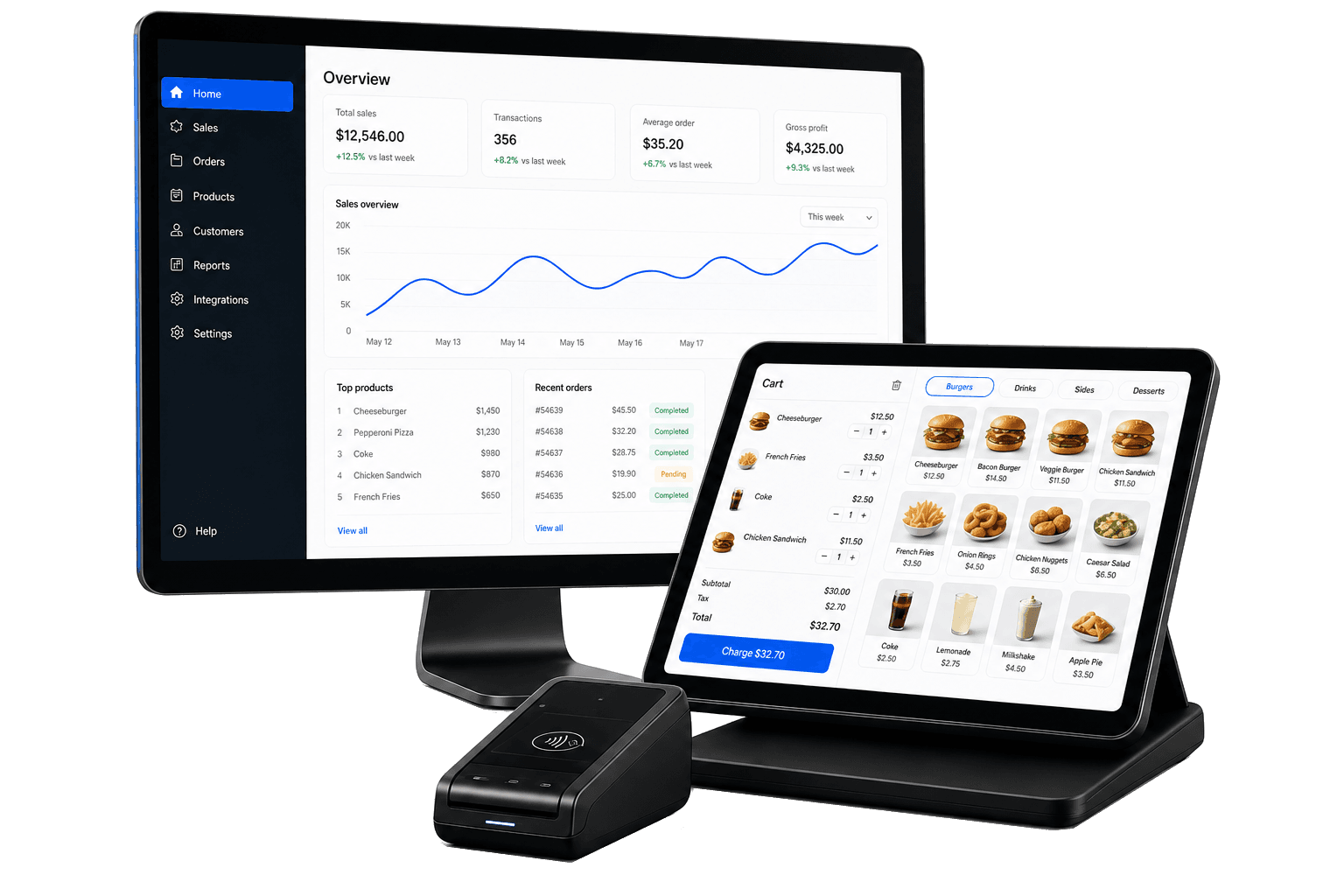
Run every branch from one POS — without spreadsheets or disconnected tools
Checkout, fulfillment, inventory, and staff control in one place. Built for restaurants, cafés, and retail — from one branch or many.
- Table service + Fulfillment display
- Thermal receipts & kitchen tickets
- Keep selling if Wi-Fi drops
- 14-day free trial — no credit card
Built for how you run your business
Restaurants, cafés, and retail stores face different rush-hour problems — Sidro handles both.
Restaurants & cafés
Orders hit the fulfillment screen the moment they are placed
Kitchen does not see orders fast enough
Manager PIN before voids and discounts on open tabs
Anyone can void an open tab
Track ingredients behind your menu, not just finished SKUs
Ingredient stock runs out mid-service
On the floor. Order, then kitchen ticket, then bump, then checkout
Built for real multi-branch operations
Fewer mistakes during rush
Clear POS flows for counter and table service, parked tickets, and fulfillment screens — so orders do not get lost when it is busy.
One catalog and stock count
Products, promotions, and inventory stay in sync across branches. No duplicate spreadsheets or manual stock updates.
You control voids and discounts
Not everyone on the floor has the same keys. Staff need manager approval before voiding checks or applying sensitive discounts.
See Sidro the way each person uses it
One job. One screen. Flip the role to see what goes on the floor for that person — with more native apps on the way.
Counter · Android POS app
Ring up counter sales, open tabs, takeaway, and delivery from the floor.
Cash, card, and e-wallet keep going if Wi-Fi drops.
Android POS app
Cashier
Coming soon
- iOS POS app — Native iOS POS for iPad counters and floor tablets
- Native Fulfillment display app — Fullscreen prep queue without browser chrome
- Native Customers app — Customer lookup and profiles on a dedicated device
- Customer display — Customer-facing screen for order totals and payment prompts
- Self-service kiosk — Guest-facing order and pay on kiosk hardware
Works with the hardware you already use — and more coming
Works today
- PC & desktop browser — Run web POS on Windows or Mac today
- Android tablet — Native POS app for counter and floor tablets
- Fulfillment display screen — Dedicated prep queue in any browser
- Thermal receipt printers — Print receipts, bills, and kitchen tickets from Android POS and PC POS
On our roadmap
- Cash drawer — Automatic drawer kick on payment
- Self-service kiosk — Guest order and pay on kiosk enclosure hardware
- Customer display — Companion screen facing the customer at checkout
Guests can order from the table today
QR menu is live. Own online ordering is on our roadmap.
Available now
- QR menu — Guests scan a table QR, browse the menu, and send orders to the floor
On our roadmap
- Online ordering — Customers place orders from your own site — tickets join the same floor flow
What you can use today
Four things that run the floor. Then catalog, stock, staff, and reporting that keep branches in sync.
Hospitality & retail POS
Ring up counter sales or run table service with open tabs, takeaway, and delivery orders at the register — plus bundles, modifiers, and discounts built for rush hours.
Fulfillment display
Route tickets to kitchen, bar, or packing. Your team sees orders, bumps completed items, and recalls tickets in real time.
QR menu
Guests scan a table QR, browse the menu, and send orders to the floor. New tickets show up on POS and Fulfillment display.
Keep selling if Wi-Fi drops
Take cash, card, and e-wallet orders on the floor even when the internet is down. They sync when you are back online — so a dropped connection does not stop lunch rush.
Also included
Dashboard & reporting
See daily sales, trends, top products, tax breakdowns, and staff performance — by branch or shift.
Catalog & promotions
Keep products and categories consistent, run promo codes and presets, and set automatic rules like lunch specials.
Branch inventory
Track stock per location, monitor ingredients behind your menu, and get low-stock alerts before you run out mid-service.
Staff & permissions
Staff cannot void checks or stack discounts alone — managers approve with a PIN. Assign roles and branches per team member.
Order history
Search past orders, review checks and refunds, and export CSV on Professional — so you can reconcile sales without digging through receipts.
Customers
Save customer profiles, addresses, and order-linked history so your team recognizes regulars and follows up on repeat business.
Plans that grow with your business
Choose the plan that fits your business. Upgrade or downgrade anytime.
These are our current commercial prices, billed monthly in USD.
Starter*
- 1 branch included
- 500 SKUs
- Catalog & inventory
- Promotions & discounts
- Customers & order history
- Email support
Professional*
14-day free trial
- 1 branch included
- Unlimited SKUs
- Fulfillment display
- Full reporting & tax breakdowns
- Staff & role management
- CSV order export
Enterprise
- Unlimited branches
- Unlimited SKUs
- Optional dedicated app & server
- Dedicated onboarding
- Custom integrations
- Priority support & SLA
Compare Starter and Professional
Starter runs the shop. Professional runs the team — fulfillment screen, staff permissions, and full reporting.
| Capability | Starter $39/mo | Professional $79/mo Most popular |
|---|---|---|
| POS (restaurant + retail) | ||
| Catalog & categories | ||
| Promotions & discounts | ||
| Branch inventory | ||
| Basic dashboard | ||
| Customers | ||
| Order history | ||
| Fulfillment display | ||
| Staff & role management | ||
| Full reporting & tax breakdowns | ||
| CSV order export | ||
| Active products | Up to 500 | Unlimited |
| Branches included | 1 (+ $15/mo each) | 1 (+ $15/mo each) |
| Support | Standard | |
| 14-day free trial |
* Additional branches available at $15/mo each.
Need something tailored? Two paths.
Same platform — different levels of customization and isolation.
Custom POS app
Your app, your brand — on Sidro cloud.
- Tailored POS flows and branding for your operation
- Data uploads to shared Sidro cloud — no private server required
- Project fee quoted by sales
Enterprise dedicated deployment
Your app and optionally your own server — built for one organization.
- Full Enterprise tier with unlimited branches and SLA
- Optional dedicated app and server for one customer
- Custom contract and onboarding
Build on Sidro's cloud — we'll handle the backend
API-first POS platform for teams that excel at hardware or client UX, not multi-tenant cloud operations.
- Hardware companies — tablets, kiosks, printers, payment terminals
- App and ISV developers — custom POS or vertical clients on Sidro cloud
- System integrators — deploy Sidro without building backend from scratch
Custom apps
- Your UI, Sidro API and shared cloud
- Store-scoped API for catalog, orders, and inventory
- Android and web reference clients
Hardware partners
- Qualify printers, drawers, and kiosk peripherals
- Co-sell or integrate Sidro as the software layer
- Multi-branch roles enforced server-side
Accounting & ops integrations
- QuickBooks/Xero-style exports on the roadmap
- Orders and catalog data via store-scoped API
- Partner with us to prioritize your integration
Frequently asked questions
Answers grouped the way owners actually ask — plans first, then the floor, then custom work.
Plans & trial
Yes. POS, Fulfillment display, QR menu, catalog, inventory, printing, Sidro Clock, and back office are shipping today. Roadmap items are labeled clearly — see Features and Apps.
Starter and Professional include one branch. Additional branches are $15/mo each. Enterprise includes unlimited branches — contact sales for terms.
Yes. The prices on this page are our current commercial plans, billed monthly in USD. Additional branches are $15/mo each on Starter and Professional. Enterprise is quoted by sales.
Start Professional free for 14 days — no credit card required. You get Fulfillment display, staff permissions, full reporting, and CSV export. Contact us before day 14 if you want to continue or change plans.
Starter fits single-location operators who need catalog, inventory, promotions, Customers, and order history. Choose Professional when you need Fulfillment display, staff permissions, full reporting, and CSV export — 14-day trial available.
We reply within one business day to schedule a 15-minute walkthrough tailored to your business type and branch count. No setup required beforehand.
The floor
Yes. Sidro handles table service, open tabs, takeaway, and delivery orders taken at the register, plus fulfillment displays for hospitality — and counter sales, promotions, and stock tracking for retail.
Staff roles need manager or owner PIN approval for voids and sensitive discounts. You control the policy per store — owners and managers have full access.
Available now: web POS and back office, web Fulfillment display, Android POS, and Sidro Clock. Coming soon: iOS POS, native Fulfillment display, native Customers app, customer display, and self-service kiosk.
Yes — most operators run checkout on a counter tablet or PC and a separate screen for prep. Both connect to the same Sidro store. Book a demo to walk through your layout.
Keep taking cash, card, and e-wallet orders on the floor. They sync when you are back online. Opening or closing a shift still needs a connection. Book a demo if you want to see the offline flow.
Self-service kiosk mode is on our roadmap. The software design supports it — hardware options are still being qualified. Tell us on your demo if kiosk ordering matters to you.
Android POS and PC POS print receipts, bills, and kitchen tickets today. Automatic cash drawer kick is still on our roadmap — ask on your demo for timeline. Browser receipts remain available.
QR menu is live — guests scan a table code, browse, and send orders to the floor. Own online ordering is still on the roadmap. Book a demo if you want to see the QR flow.
Custom & partners
A custom POS app is a tailored client on shared Sidro cloud — project fee. Enterprise is a full tier with optional dedicated app and server for one organization. See the Solutions section for details.
Yes — our custom POS app offering covers branded flows on Sidro cloud. Contact sales for scope and fee. Technical details for builders are in the Partners section.
Yes — see the Partners section for hardware, ISV, and integration collaboration. Business owners should use the main Book a demo flow.
Ready to see Sidro on your floor?
15-minute walkthrough. 14-day trial available — no credit card.
On the roadmap
On our roadmap — tell us what you need on your demo.
Apps
- iOS POS app
- Native Fulfillment display app
- Native Customers app
- Customer display
- Self-service kiosk
Omnichannel
- Online ordering
Hardware & peripherals
- Cash drawer integration
- Self-service kiosk hardware
Integrations
- Accounting integrations